Hemingway
Make your writing bold and clear.
Grow your DR (guaranteed) & Rank on Google, ChatGPT, and Claude
🚀 DR Boost — £199
5× dofollow backlinks from DR 20–70 sites
⚡ DR Mega Boost — £279 Best value
10× dofollow backlinks — 30% cheaper per link
Quick summary of Hemingway
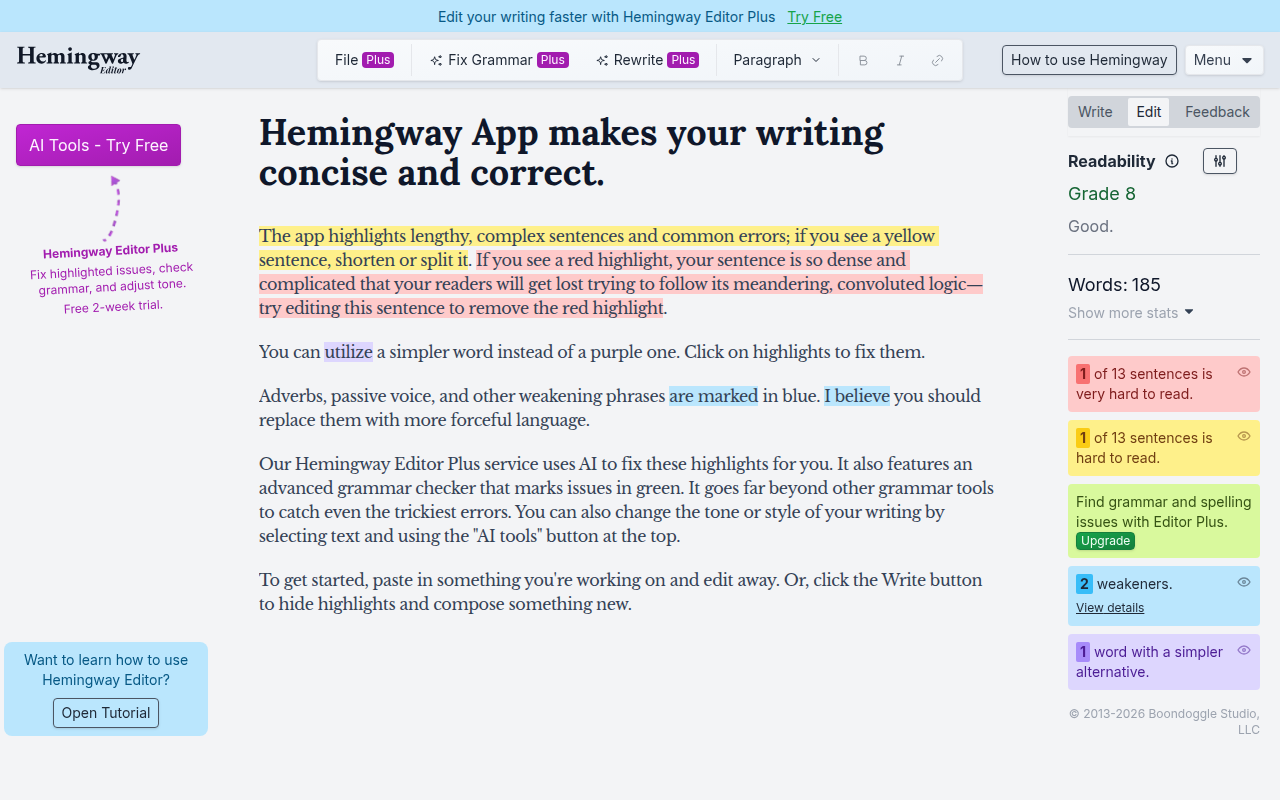
Hemingway Editor is the writing clarity tool that makes prose bolder and clearer by surfacing overly-complex sentences, passive voice, weak adverbs, and difficult-to-read passages. Created in 2013 by brothers Adam and Ben Long as a side project, named after Ernest Hemingway's direct prose style. Inspired by 'good writing is bold and clear' philosophy. Distinguished from Grammarly by narrow focus on readability + clarity rather than comprehensive grammar/spell checking. Core features: Flesch-Kincaid readability grade level showing complexity (target Grade 8-10 for most prose), yellow + red highlights for hard-to-read sentences, passive voice detection ('was written by' vs 'wrote'), adverb count highlighting weak modifiers ('very', 'really', 'just', 'quite'), complex phrase suggestions for unnecessarily complex constructions, word count and reading time at-a-glance, distraction-free Format mode for writing in Hemingway, Edit mode for analysing pasted existing writing, recent AI Plus subscription adding AI rewriting and paraphrasing and tone adjustment, exports to Markdown/HTML/PDF/Word, web app at hemingwayapp.com with no account required, desktop app for Mac/Windows/Linux with offline editing. Best for landing page copy bolder and clearer value propositions (huge conversion impact), blog post editing for content marketing readability, cold email and sales writing where shorter sentences correlate with better response rates, marketing copy across ads/social posts/taglines, book and manuscript editing for non-fiction readability, student essays for academic submission improvement, newsletter writing for accessible broad audience writing, founder personal brand writing for clear LinkedIn/X posts. Pricing: Web app free with unlimited use no signup required, Desktop app $19.99 one-time (Mac + Windows + Linux), Hemingway Plus $20/month (AI rewriting + paraphrasing + tone + cloud sync). Direct competitors: Grammarly (broader grammar + spelling + style with browser integration, paid subscriptions), ProWritingAid (comprehensive style + grammar + reports, $20-$30/month), Wordtune (AI rewriting focus), QuillBot (paraphrasing + grammar), LanguageTool (open-source Grammarly alternative), After the Deadline (open-source), Slick Write (free web), Ginger Software, Scribens. Hemingway wins on free unlimited web app and singular readability focus and one-time $20 desktop license; Grammarly wins on browser integration and comprehensive grammar/spell checking; ProWritingAid wins on detailed reporting depth; Wordtune wins on AI rewriting specifically.
⏱ 30-second verdict
- Singular focus on readability + clarity beats Grammarly's broader scope for non-fiction writing
- Free web app is genuinely unlimited with no signup walls — most users never need to pay
- Opinionated style doesn't fit all writing; not a grammar/spell checker (need Grammarly for that)
About
A writing tool that flags long sentences, passive voice, adverbs, and overly complex words. Free web version covers most needs.
🎯 Why it's useful
Forces you to write at a 6th-grade reading level — exactly what marketing copy and product descriptions need.
💜 Our take
The free web version is enough. We use it on every landing page draft.
Key Features
Integrations
✓ Best for
Bloggers, content marketers, and indie writers who want to improve clarity and readability quickly. Solo founders writing copy, documentation, or marketing content benefit most from the free web version.
✗ Not ideal for
Teams needing collaborative editing features or advanced analytics. Fiction writers who prioritize stylistic voice over strict clarity rules may find the suggestions overly prescriptive.
How indie founders use Hemingway
Landing page copy
Make value props bolder + clearer. Huge impact on conversion rates. Mandatory for every founder writing marketing copy.
Blog post editing
Clean content marketing pieces for readability. Lower grade level = broader audience reach.
Cold email + sales writing
Sharpen outreach emails. Shorter, clearer sentences correlate with better response rates.
Book + manuscript editing
Non-fiction authors checking readability + adverb counts. Reduces editing rounds with editors.
Hemingway Editor is the writing tool that makes your prose bolder and clearer by surfacing overly-complex sentences, passive voice, weak adverbs, and difficult-to-read passages. Created in 2013 by brothers Adam and Ben Long as a side project, Hemingway has become the most-recommended writing aid for non-fiction writing — used by founders for landing page copy, marketers for blog posts, students for essays, and any writer trying to make their prose more direct. What makes Hemingway distinctive vs Grammarly is the focus. Grammarly is a comprehensive grammar + spell checker + style assistant. Hemingway focuses narrowly on readability + clarity — highlighting sentence complexity, passive constructions, weak adverbs, and reading level. The Hemingway aesthetic is opinionated: 'good writing is bold and clear' inspired by Ernest Hemingway's prose style. Apply Hemingway to your writing and the average sentence length drops, the readability grade lowers, and the writing feels more direct. The core feature set: • **Readability grade** — Flesch-Kincaid grade level showing complexity (target Grade 8-10 for most prose) • **Hard-to-read sentence highlighting** — yellow + red highlights for overly complex sentences • **Passive voice detection** — yellow highlights for passive constructions ('was written by' vs 'wrote') • **Adverb count** — highlights weak adverbs ('very', 'really', 'just', 'quite') suggesting cuts • **Complex phrase suggestions** — alternative phrasings for unnecessarily complex constructions • **Word count + reading time** — at-a-glance stats while writing • **Format mode** — write in Hemingway's clean distraction-free environment • **Edit mode** — paste existing writing for analysis + improvement • **Plus version AI features** — AI suggestions for fixing highlighted issues + paraphrasing • **Export options** — to Markdown, HTML, PDF, Word • **Web + desktop versions** — web app free, desktop ($19.99 one-time) for offline + advanced • **No account required (web)** — open hemingwayapp.com and start writing immediately • **AI Plus subscription** — newer paid tier with AI rewriting + tone adjustment For writers + founders + marketers the use cases: • **Landing page copy** — make value propositions bolder + clearer (huge for conversion) • **Blog post editing** — clean up content marketing pieces for readability • **Email writing** — sharpen cold outreach + sales emails (shorter sentences = better response rates) • **Marketing copy editing** — ad copy, social posts, taglines • **Book writing + manuscript editing** — non-fiction authors checking readability • **Student essays** — improve writing for academic submissions • **Newsletter writing** — accessible writing for broad audiences • **Founder personal brand writing** — clear LinkedIn/X posts that read well The pricing is friendly. Web app is free with unlimited use — no signup, no limits, completely free. Desktop app is $19.99 one-time (Mac + Windows + Linux). Plus subscription at $20/month adds AI rewriting + paraphrasing + tone adjustment + cloud sync (recently introduced). For most users the free web app is sufficient — the desktop app and Plus features are nice-to-haves rather than necessities. Where Hemingway wins clearly: the singular focus on readability + clarity is more useful than Grammarly's broader scope for non-fiction writing; the free web app is genuinely unlimited (no signup walls or feature gates); the opinionated 'shorter + bolder = better' aesthetic genuinely improves most prose; one-time $20 desktop license is generous in a subscription-everything world; the simplicity means no learning curve. Where it loses: not a grammar/spell checker — you need Grammarly for that (or built-in browser checkers); the opinionated style doesn't fit all writing (fiction, technical documentation, formal academic writing benefit less); the AI features in Plus subscription are weaker than ChatGPT + Claude for similar tasks at much higher cost; no real-time integration with Google Docs / Word / browsers (you copy-paste back and forth). My take: for any founder writing landing page copy, marketers writing blog content, or anyone writing non-fiction prose where clarity matters — Hemingway is mandatory tooling and the free web app is enough. Paste your draft, fix the red sentences, kill the adverbs, ship. For broader grammar + spell checking, use Grammarly alongside Hemingway. For technical/formal writing where complexity is necessary, ignore Hemingway's suggestions to simplify. The classic workflow: write in your normal editor (Notion, Google Docs, etc.), paste into Hemingway for clarity check, edit per suggestions, paste back. 5-minute process that meaningfully improves writing quality.
Pricing
Web app
- ✓Unlimited use
- ✓No signup required
- ✓All core features
- ✓Most users need only this
Desktop app
- ✓Mac + Windows + Linux
- ✓Offline editing
- ✓Save files locally
- ✓PDF + Word export
Hemingway Plus
- ✓AI rewriting + paraphrasing
- ✓Tone adjustment
- ✓Cloud sync across devices
- ✓Recently introduced premium
Free web version · Desktop app $19.99 one-time (Mac/Windows)
Frequently asked questions
Hemingway vs Grammarly?
Different scopes. Hemingway focuses narrowly on readability + clarity (sentence complexity, passive voice, adverbs). Grammarly is broader (grammar, spelling, tone, plagiarism, style). Use both for serious writing: Hemingway for clarity, Grammarly for grammar/spelling. For landing page copy + marketing prose, Hemingway alone is often sufficient.
Is Hemingway free?
Yes — the web app at hemingwayapp.com is completely free with no signup or limits. Desktop app is $19.99 one-time for Mac/Windows/Linux. Plus subscription at $20/month adds AI features. For most users the free web app is genuinely sufficient.
Should I follow all Hemingway suggestions?
No — Hemingway's style is opinionated ('shorter + bolder = better') which doesn't fit all writing. Fiction, technical documentation, formal academic writing often benefit from complex sentences. Use Hemingway's highlights as suggestions, not commands. For landing pages + blog posts + marketing copy, following 80% of suggestions usually improves prose.
What readability grade should I target?
Grade 8-10 for general business writing (most adult Americans read at Grade 8). Grade 6-8 for marketing landing pages aimed at broad audiences. Grade 10-12 for technical or industry-specific content. Below Grade 6 feels condescending; above Grade 12 loses readers. Hemingway displays your grade in real-time as you edit.
Hemingway Plus AI vs ChatGPT?
ChatGPT (free or $20/month) is dramatically more capable for rewriting + paraphrasing + tone adjustment. Hemingway Plus AI ($20/month) is more focused on readability fixes. For pure writing improvement, ChatGPT/Claude are better tools. Use free Hemingway web app for clarity highlighting + ChatGPT for rewriting suggestions.
Reviews
No reviews yet — be the first.