ClickUp
The "everything app" for work.
Grow your DR (guaranteed) & Rank on Google, ChatGPT, and Claude
🚀 DR Boost — £199
5× dofollow backlinks from DR 20–70 sites
⚡ DR Mega Boost — £279 Best value
10× dofollow backlinks — 30% cheaper per link
Quick summary of ClickUp
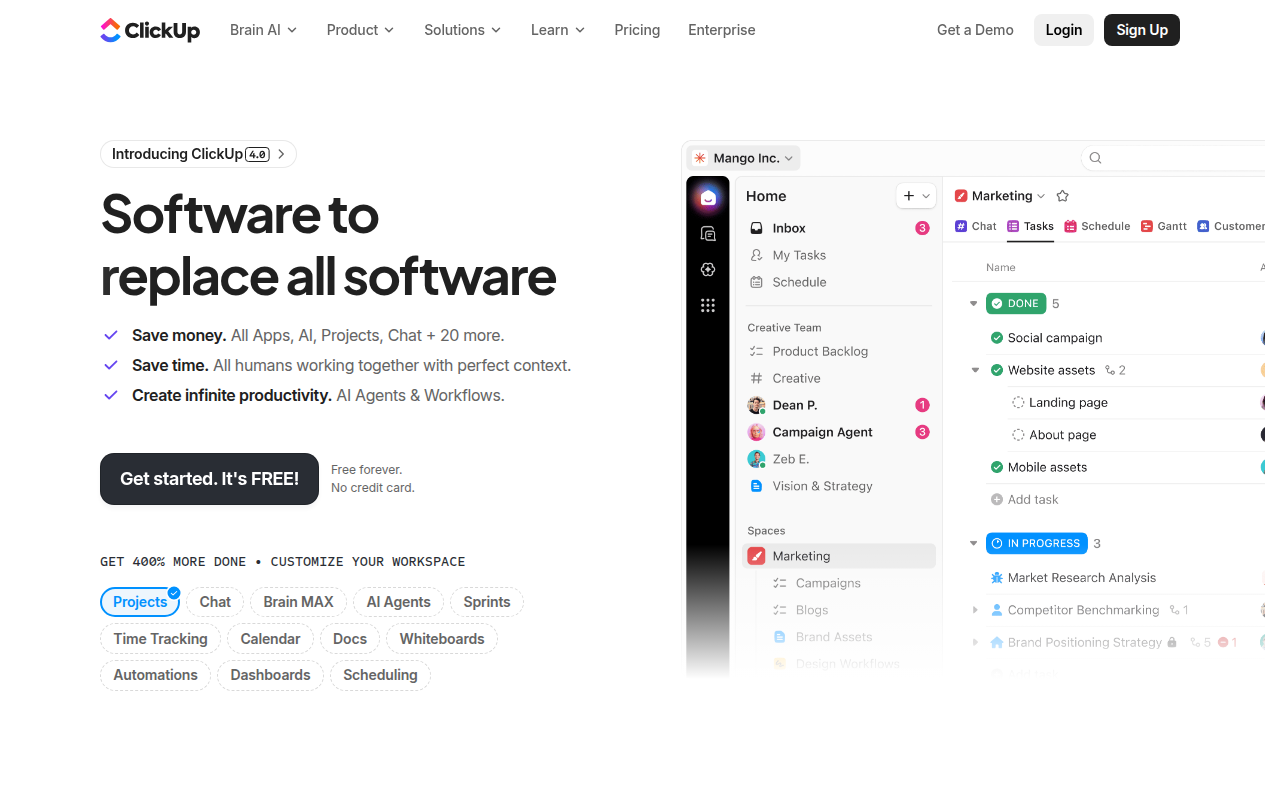
ClickUp is an all-in-one productivity platform founded in 2017 by Zeb Evans, marketed as 'one app to replace them all' — combining project management, docs, whiteboards, chat, CRM, time tracking, goals, and AI in one workspace. Core features: tasks with 15+ views (list, kanban, calendar, gantt, timeline, mind map, table, workload), Notion-style docs with embedded views, Miro-style whiteboards, Slack-style in-app chat, OKR and goal tracking, native time tracking and timesheets, custom dashboards, built-in CRM for SMB sales, intake forms creating tasks automatically, automation engine (Zapier-style triggers and actions), ClickUp Brain AI for thread summarisation and auto-status-updates and workspace querying. Best for startups consolidating Asana + Notion + Slack + Miro into one tool, agencies managing 10+ client projects with billing-quality time tracking, product teams running sprint cycles end-to-end in one workspace, operations teams documenting and executing processes, and solo founders or 2-3 person teams (Free Forever plan is generous). Pricing: Free Forever (unlimited tasks, unlimited members, 100MB storage), Unlimited at $10/user/month (full feature set), Business at $19/user/month (advanced automations, workload management), Business Plus at $29/user/month (team sharing, custom roles). Direct competitors: Asana (cross-functional work management, enterprise polish), Notion (docs-first with tasks), Monday.com (visual workflow), Trello (kanban-only simplicity), Linear (engineering-focused), Wrike (enterprise PM), Smartsheet (spreadsheet-PM hybrid), Airtable (database-PM hybrid), Basecamp (opinionated simplicity). ClickUp wins on breadth, free tier, and price; Asana wins on enterprise adoption and UX polish; Linear wins on engineering teams; Notion wins on knowledge base depth.
⏱ 30-second verdict
- One tool replaces Asana + Notion + Slack + Miro — real savings if you commit
- Best free tier in the category — unlimited tasks + unlimited users
- Setup overhead is real; without a champion the workspace becomes chaotic
About
Tasks, docs, whiteboards, time tracking, goals, and chat in one tool. Highly configurable but takes time to set up properly.
🎯 Why it's useful
Genuinely consolidates 5+ tools — useful when budget is tight and you want one bill instead of five.
💜 Our take
The custom fields system is incredibly powerful once you grok it.
Key Features
Integrations
✓ Best for
Growing teams (5-50 people) and agencies that need an all-in-one workspace to replace multiple tools. Works well for project-heavy organizations willing to invest in setup and customization.
✗ Not ideal for
Solo founders seeking simplicity—ClickUp's extensive customization creates setup overhead. Teams needing lightweight, minimal-config solutions should consider simpler alternatives.
How indie founders use ClickUp
Tool consolidation
Replace Asana + Notion + Slack + Miro with one subscription. Real savings ~$80/user/month if your team commits.
Agency client management
Custom views per client, time tracking for billing, dashboards for utilization. Built-in invoicing handoff via integrations.
Startup sprint planning
Whiteboard + docs + sprint backlog + retrospectives all linked in one workspace. Sprint cycles in one tool.
OKR + goal tracking
Set quarterly goals, link them to tasks, track progress via dashboards. Closes the gap between planning and execution.
ClickUp is the ambitious all-in-one productivity platform, founded in 2017 by Zeb Evans with the famously bold tagline 'One app to replace them all.' It tries to be a project manager, doc editor, whiteboard, chat tool, CRM, and goals tracker — all in one workspace. Whether that's brilliant or chaotic depends entirely on how you set it up. The pitch lands because most startups use 5-8 different productivity tools and pay for all of them. ClickUp says: do everything inside one tool with one bill. For teams that adopt it properly, this works and saves real money. For teams that don't fully commit, ClickUp becomes a graveyard of half-used features alongside the other 5 tools they kept. The scope is genuinely huge: • **Tasks + projects** — lists, kanban, calendar, gantt, timeline, mind map, table views. Custom fields, dependencies, automations • **Docs** — Notion-style wiki and document editing with embedded tasks/views • **Whiteboards** — Miro-style collaborative whiteboarding for brainstorming + sprint planning • **Chat** — Slack-style in-app messaging tied to tasks and docs • **Goals + OKRs** — set quarterly goals, track progress via linked tasks • **Time tracking** — built-in timers and timesheet reporting • **Dashboards** — custom dashboards aggregating tasks, time, sprint metrics • **CRM** — yes, a built-in CRM (limited but usable for SMB sales) • **Forms** — collect external requests that auto-create tasks • **AI (ClickUp Brain)** — summarise threads, generate task descriptions, auto-write status updates, query your workspace • **Automations** — Zapier-style trigger/action flows inside the platform For founders the use cases: • **Startup replacing Asana + Notion + Slack + Miro** — consolidate to one tool, save $80+/user/month vs separate subscriptions • **Agency managing 10+ client projects** — custom views per client, time tracking for billing, dashboards for utilization • **Product team with sprint cycles** — sprint planning + whiteboard + docs + tasks in one place • **Operations + ops-heavy teams** — process documentation + checklists + tasks all linked • **Solo founder or 2-3 person team** — Free Forever plan is genuinely generous for small teams The pricing is the most aggressive in the category. Free Forever plan covers unlimited tasks, unlimited members, 100MB storage — meaningfully more than Asana or Monday at the same tier. Unlimited plan at $10/user/month unlocks the full feature set (the value-for-money winner of the category). Business at $19/user/month adds advanced automations, time tracking, and admin features. Where ClickUp wins: breadth + price are unmatched, the free tier is the most useful in the category, AI features (ClickUp Brain) are genuinely deep, and you really can consolidate 5 tools into one if you commit. Where it loses: the surface area is overwhelming for new users (you need a champion to set it up properly), occasional performance issues at large scale (10K+ tasks), the chat + whiteboard + docs are good-not-great vs dedicated tools (Slack, Miro, Notion individually beat ClickUp's equivalents). My take: ClickUp is a high-variance bet. If your team has a designated champion who'll set it up properly with templates, naming conventions, and onboarding — it's transformative and saves significant money. If you're hoping it'll just work out of the box for everyone, you'll end up with a chaotic workspace and people will still default to their old tools. For startups in the 5-25 person range with a operations-minded founder, ClickUp is the highest-leverage productivity bet on the market. For larger teams, Linear (engineering) + Notion (docs) + Asana (cross-functional) often serves better.
Pricing
Free Forever
- ✓Unlimited tasks
- ✓Unlimited members
- ✓100MB storage
- ✓Docs + Whiteboards
Unlimited
- ✓Unlimited storage
- ✓Unlimited integrations
- ✓Unlimited dashboards
- ✓Native time tracking
Business
- ✓Advanced automations
- ✓Advanced time tracking
- ✓Workload management
- ✓Custom exporting
Business Plus
- ✓Team sharing
- ✓Custom role creation
- ✓Increased automations
- ✓Priority support
Free · Unlimited $10/mo · Business $25/mo · Enterprise custom
Frequently asked questions
Is ClickUp really free?
Yes — Free Forever plan gives unlimited tasks, unlimited members, and 100MB storage. The best free tier in the productivity category. Real limitations are storage and some advanced features (automations, dashboards) gated to paid plans.
ClickUp vs Notion?
ClickUp is task-first with docs as a feature. Notion is docs-first with tasks as a feature. For project management ClickUp wins. For wiki + knowledge base + flexible structure, Notion wins. Many teams use both; some consolidate to one.
ClickUp vs Asana?
ClickUp is broader (docs + whiteboards + chat + CRM included) and cheaper. Asana is more focused on cross-functional work management with better UX polish and team adoption. Asana is the safer enterprise choice; ClickUp is the higher-leverage SMB choice.
Is ClickUp Brain (AI) any good?
Yes — better than most workspace AI features. It summarises long threads, auto-generates status updates from linked tasks, queries your workspace ('what's the status of the launch project?'), and writes task descriptions. Worth the $5/user/month add-on for active workspaces.
Can ClickUp really replace 5 tools?
For small-to-medium teams that commit fully, yes. For larger teams or teams with strong existing tooling, partial consolidation is more realistic — typically replacing Asana + a wiki tool, while keeping Slack and Miro. The 'replace them all' marketing is aspirational; results depend on adoption commitment.
Reviews
No reviews yet — be the first.
Tools like ClickUp
See all Productivity →Notion
The all-in-one workspace for notes, docs, and projects.
Linear
Issue tracking that respects your time.
PDF0
Fast, free PDF tools that run entirely in your browser.
Yo!
The Yo! Podcast spotlights incredible designers, developers, makers and entrepreneurs building their own future.
Workflow
Workflow is a project manager built for creative teams. Streamlines reviews and iterations. Built-in AI catches design mistakes.
Webflail
Join 750+ designers and developers to learn how to reach a profitable and fulfilling freelancing from expert Webflowers.